Install main app & agent IPA
tip
- Standalone edition needs iOS 15+ — older versions are not supported
- Third-party IPAs must be signed before install
tip
- 7.0.0+ supports single-app and dual-app automation engines
- Single-app: install the main app only → Settings → Automation → Single app → save → start automation
- Dual-app: also sign and install the agent IPA
- Why both?
- Single-app is faster and needs one signed IPA (legacy-friendly)
- Dual-app runs in a separate process and can self-reactivate for unattended runs
Download the main package
- From cloud downloads
- EC package → iOS resources → Standalone edition → latest version (e.g. v6.4.0)
Contains main IPA, agent IPA, and optional agent Xcode source

easyclick-tj-main-….ipa— standalone main appeasyclick-tj-agent-….ipa— standalone agenteasyclick-tj-agent-source-….zip— agent Xcode source (optional)
Sign & install the main app
- Supports personal free / paid developer / enterprise / TrollStore and most common signers
- Guide → IPA signing
- After signing, install with iTools / similar tools
- Phone shows EasyClick Cloud Test (易点云测) — open the app:

Keep-alive
- Settings (top-right) → Keep-alive → Save; when the float window appears, drag it to a screen edge to hide
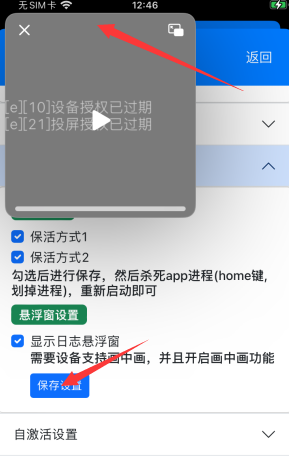
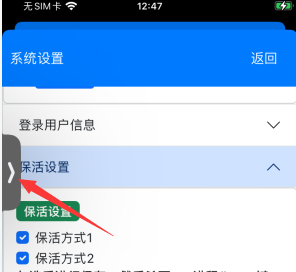
- Allow location while using (first launch)
- Or iOS Settings → EasyClick Cloud Test (易点云测)

- Location: Always; Background App Refresh: On; Cellular + Wi‑Fi; enable Siri & Search as needed

License init
- Standalone is paid per device
- Text → standalone center docs
- Video → standalone course
Sign & install the agent
- Agent IPA is special — personal free accounts and many tools (iTools / Sideloadly) often fail; search 签名 on the EC forum
- Guide → IPA signing
- On macOS you can build agent source in Xcode (personal free account OK) — see USB macOS source build
- After install, open EasyClick-Runner — system should show white Automation Running
- If not → mount developer image